
COMPETITIVE SOCCER
About Our Competitive League
Yankton United Competitive Soccer 2026-2027 Season
PLEASE READ BEFORE REGISTERING
Welcome to the 2026-2027 Season of Yankton United Competitive Soccer.
By registering with Yankton United Soccer, your player will develop more competitive skills, compete in tournaments and clinics, and if they choose to move on, be prepared for High School Soccer.
Registration does not include tournament fees, travel and hotel, or uniform. Information about these items will be provided to the players and parents by your coach.
Registration is $175 for ages U9-10 and $225 for ages U11 and up PLUS a $5 Capital Funds Fee assessed for each player. This small fee will go towards the maintenance and growth of our new Soccer Complex.
Registration includes Fall, Winter (Indoor Soccer), Spring and Summer. Season begins August 1st, 2026 and ends July 31st, 2027.
Players who are U12 and younger MUST also register for Rec soccer. U14 and above have aged out of the YYSA Rec Soccer Program and will play Club Soccer exclusively.
YYSA is an all inclusive organization. All players who try out and register will play for Yankton United.
Please pay special attention to our new Volunteer requirements that will be explained further into the registration process.
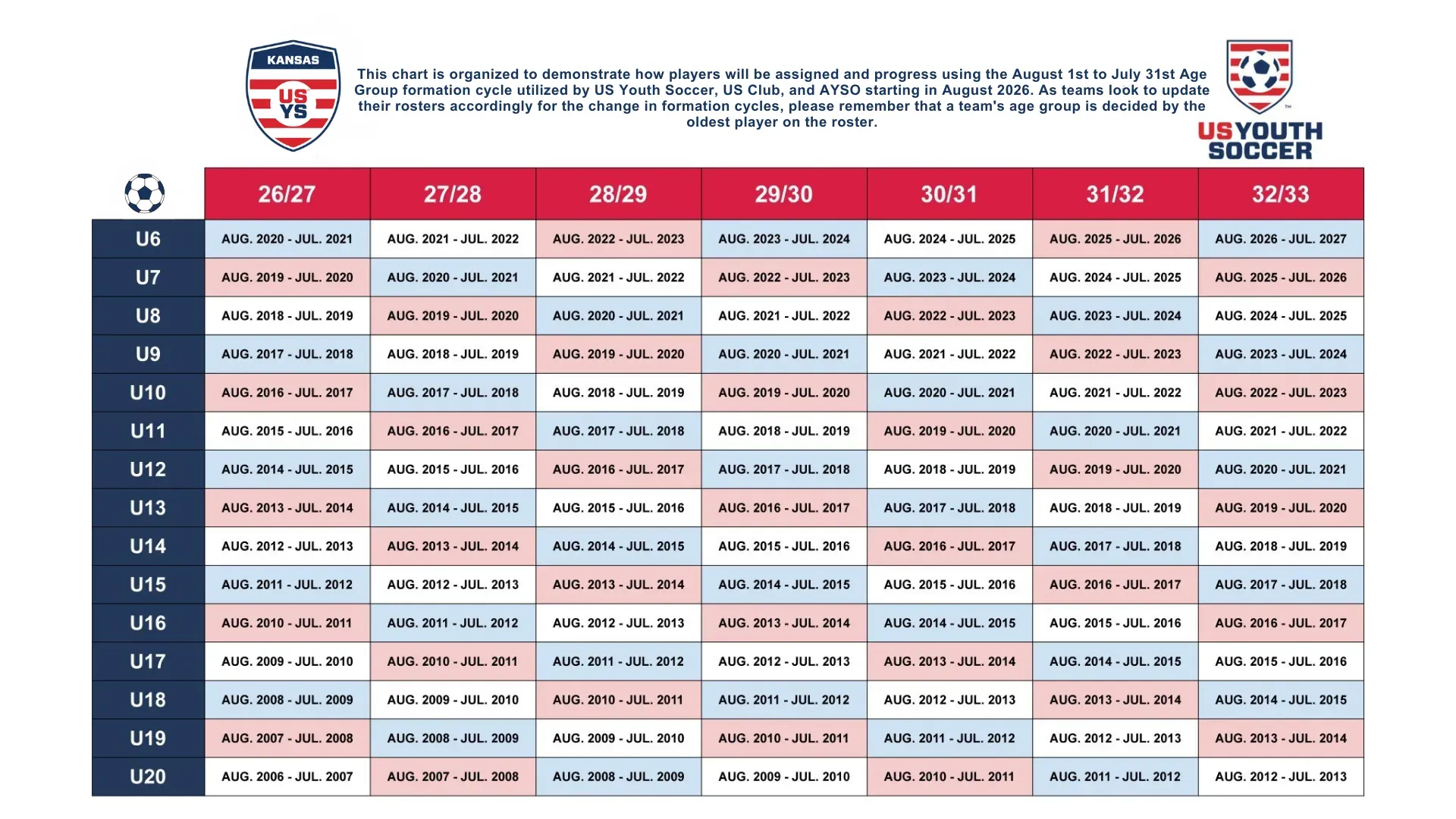
Eligibility Age Ranges
Weather and Rescheduling Policy
Any weather related changes will be relayed by your Coach and posted on our Social Media Facebook Page. Any questions please reach out to your coach directly.
Soccer is played in a variety of weather. Cancellations and postponements will only happen due to field conditions, lighting, and extreme heat.
Club Volunteer Requirements
Thank you for being a part of Yankton Youth Soccer Association and Yankton Futbol Club. It is because of your volunteer help we can make our club successful!
Are you looking to check your hours? Do you need to register? Follow the link below! (only one account per family)
https://www.trackitforward.com/site/yankton-youth-soccer-association
Volunteer Requirements: https://docs.google.com/document/d/1womveIQklMWqpDVQRss72UMbr3T-C5tXy0rwKbj05Mc/edit?usp=sharing
Volunteer Requirements Spanish:
https://docs.google.com/document/d/1u8GLxcKPYvxzIFL1PYYmIsdiYKMLOsKwgKhns-fzk4w/edit?usp=sharing
Updated: 7/1/2025
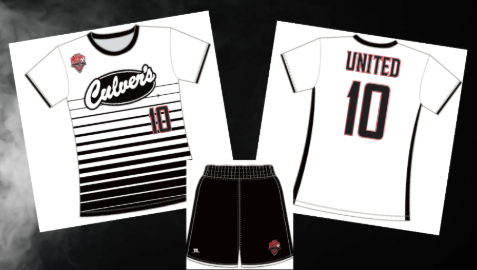
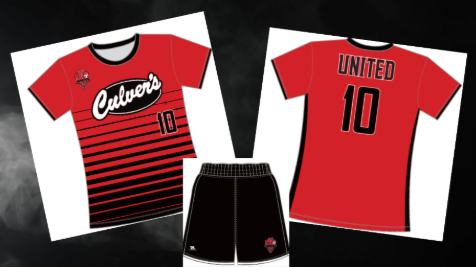
Club Uniforms
YFC Fundraising Policy
YYankton United Fundraising Policy: https://drive.google.com/file/d/1JlS5gGoQq3OPBO2kKdc2LcOXyEfG6pL-/view?usp=sharing
Yankton United Club Policies
Club Policies and Procedures: https://drive.google.com/file/d/16fQ46qRp7KqZ9iPabYoahN9abJo0SZdm/view?usp=sharing
Player Movement Policy: https://drive.google.com/file/d/1oBd1PJIc0KtfKc0hICIu436e_YaASTcF/view?usp=sharing
PP
Safesport Training Link
Safesport Training Link: https://www.southdakotasoccer.com/player-safety/safesport/
Yankton United Fan Gear
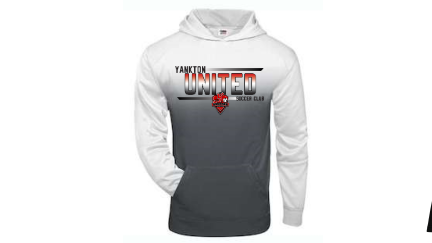
Order your Fan Gear here: https://www.yoursonthespot.com/yankton_united/shop/home
Financial Aid
Requesting Financial Aid
On Mobile
To request financial aid, navigate to the "Programs" tab located on the
bottom menu. Select the dropdown arrow next to "Programs" on the top left
hand side of the screen and click “Financial Aid”.
Note: The financial aid policy is set by your Club. If you have any questions
regarding the financial aid policy set by the Club, please reach out to your
Club directly.
On the financial aid screen, you can review the Club’s financial aid policy prior
to requesting assistance, as well as any open financial aid requests. Click the
Plus Sign button to begin the financial aid request process.
Next, select the Player(s) that need aid and fill out the financial aid request
form. Once you have completed the form click the “Submit Request” button.
Finally, you will see a pop-up message informing you that your request had
been submitted and you will receive a notification and email by the Club
when a decision regarding your financial aid request has been made.
On Desktop
To request financial aid, navigate to Club Programs located in the left-hand
menu, and click the “Financial Aid” tab in the resulting view. From here, you
can review the Club’s financial aid policy prior to requesting assistance. Click
the "Request Financial Aid" button to begin the financial aid request process.
Note: The financial aid policy is set by your Club. If you have any questions
regarding the financial aid policy set by the Club, please reach out to your
Club directly.
Next, select the Player(s) that need aid and fill out the financial aid request
form. Once you have completed the form click the “Submit Request” button.
Finally, you will see a pop-up message informing you that your request had
been submitted and you will receive a notification and email by the Club
when a decision regarding your financial aid request has been made.
For more information on receiving communications sent by the Club, please
see the article "Setting Communication preferences".
Viewing Financial Aid Decisions
On Mobile
Once the Club has made a decision regarding your financial aid request you
will receive a notification from the system. You can view the decision by
navigating to "Programs" and selecting “Financial Aid” from the dropdown
menu. Next, click on the row for your financial aid request to view the
decision.
If the Financial Aid decision was rendered in your favor, you should be able to
see a discount appear in your existing registration future payments, or in the
checkout phase of your Club Program registration. You will also have the
ability to view discounts that are available to your player in the "Available
Discounts" tab.
On Desktop
Once the Club has made a decision regarding your financial aid request you
will receive a notification from the system. You can view the decision by
navigating to CLUB PROGRAMS and clicking the “Financial Aid” tab. Next,
click on the row for your financial aid request to view the decision.
If the Financial Aid decision was rendered in your favor, you should be able to
see a discount appear in your existing registration future payments, or in the
checkout phase of your Club Program registration. You will also have the
ability to view discounts that are available to your player in the "Available
Discounts" tab.