RECREATIONAL SOCCER
About Our Recreational League
Yankton Rec Soccer is open to all players within the allotted birth date ranges.
The Yankton Youth Soccer Association Recreational Soccer Program provides a fun, inclusive, and positive environment where children of all skill levels can learn and enjoy the game of soccer. Our focus is on player development, teamwork, sportsmanship, and building confidence while fostering a lifelong love of the sport. Through age-appropriate instruction and friendly competition, we strive to create opportunities for every child in our community to play, grow, and have fun.
What to Expect
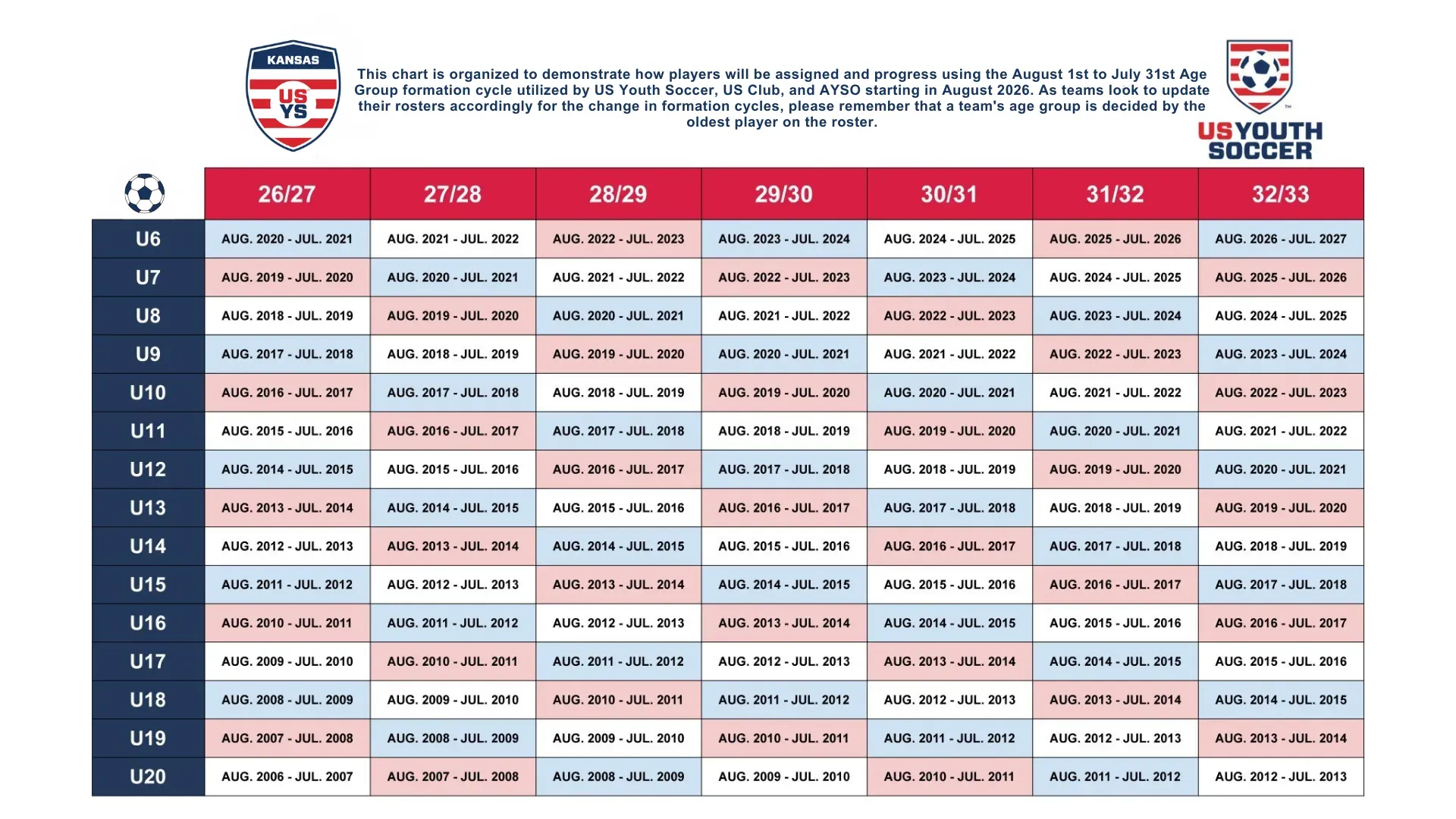
Eligibility: Yankton Rec Soccer is open to all players within the allotted birth dates for U6 and U12 (found below).
Practices: 1-2 per week, depending on your coach's availability and preference.
Games: 1 per week, unless there are reschedules, this could increase to 2 a week
Format:
U6 - 3v3 with no goalkeepers
U8 - 4v4 with no goalkeepers
U10 - 7v7 including goalkeepers
U12 - 5v5 or 7v7 or 9v9 depending on the number of registered players
Registration Opens: June 22nd 2026
Registration Closes: July 29th 20026
Early Bird Discount: June 22, 2026 to June 29 2026
Late Registration: $25 Fee
How to Register:
New Parents - Create an Account. The correct program and age group for your player will be available once you have added your child(ren) to your account
Returning Parents - Use the Same Login and Password from last year or reset your password.
Coach Assignment: Coaches are volunteers and are assigned after registration closes and teams are formed. This process takes 1-2 weeks, depending on the number of coaches who volunteered during the sign up process.
Coach Communication: Typically within the week that they are assigned, usually via text message. Be sure your communication information is current when you register to ensure no delays.
Eligibility Age Ranges
Weather and Rescheduling Policy
Any weather related changes will be relayed by your Coach and posted on our Social Media Facebook Page. Any questions please reach out to your coach directly.
Soccer is played in a variety of weather. Cancellations and postponements will only happen due to field conditions, lighting, and extreme heat.
Schedules
Safesport Training
Safesport Training: https://www.southdakotasoccer.com/player-safety/safesport/
Financial Aid
Requesting Financial Aid
On Mobile
To request financial aid, navigate to the "Programs" tab located on the
bottom menu. Select the dropdown arrow next to "Programs" on the top left
hand side of the screen and click “Financial Aid”.
Note: The financial aid policy is set by your Club. If you have any questions
regarding the financial aid policy set by the Club, please reach out to your
Club directly.
On the financial aid screen, you can review the Club’s financial aid policy prior
to requesting assistance, as well as any open financial aid requests. Click the
Plus Sign button to begin the financial aid request process.
Next, select the Player(s) that need aid and fill out the financial aid request
form. Once you have completed the form click the “Submit Request” button.
Finally, you will see a pop-up message informing you that your request had
been submitted and you will receive a notification and email by the Club
when a decision regarding your financial aid request has been made.
On Desktop
To request financial aid, navigate to Club Programs located in the left-hand
menu, and click the “Financial Aid” tab in the resulting view. From here, you
can review the Club’s financial aid policy prior to requesting assistance. Click
the "Request Financial Aid" button to begin the financial aid request process.
Note: The financial aid policy is set by your Club. If you have any questions
regarding the financial aid policy set by the Club, please reach out to your
Club directly.
Next, select the Player(s) that need aid and fill out the financial aid request
form. Once you have completed the form click the “Submit Request” button.
Finally, you will see a pop-up message informing you that your request had
been submitted and you will receive a notification and email by the Club
when a decision regarding your financial aid request has been made.
For more information on receiving communications sent by the Club, please
see the article "Setting Communication preferences".
Viewing Financial Aid Decisions
On Mobile
Once the Club has made a decision regarding your financial aid request you
will receive a notification from the system. You can view the decision by
navigating to "Programs" and selecting “Financial Aid” from the dropdown
menu. Next, click on the row for your financial aid request to view the
decision.
If the Financial Aid decision was rendered in your favor, you should be able to
see a discount appear in your existing registration future payments, or in the
checkout phase of your Club Program registration. You will also have the
ability to view discounts that are available to your player in the "Available
Discounts" tab.
On Desktop
Once the Club has made a decision regarding your financial aid request you
will receive a notification from the system. You can view the decision by
navigating to CLUB PROGRAMS and clicking the “Financial Aid” tab. Next,
click on the row for your financial aid request to view the decision.
If the Financial Aid decision was rendered in your favor, you should be able to
see a discount appear in your existing registration future payments, or in the
checkout phase of your Club Program registration. You will also have the
ability to view discounts that are available to your player in the "Available
Discounts" tab.
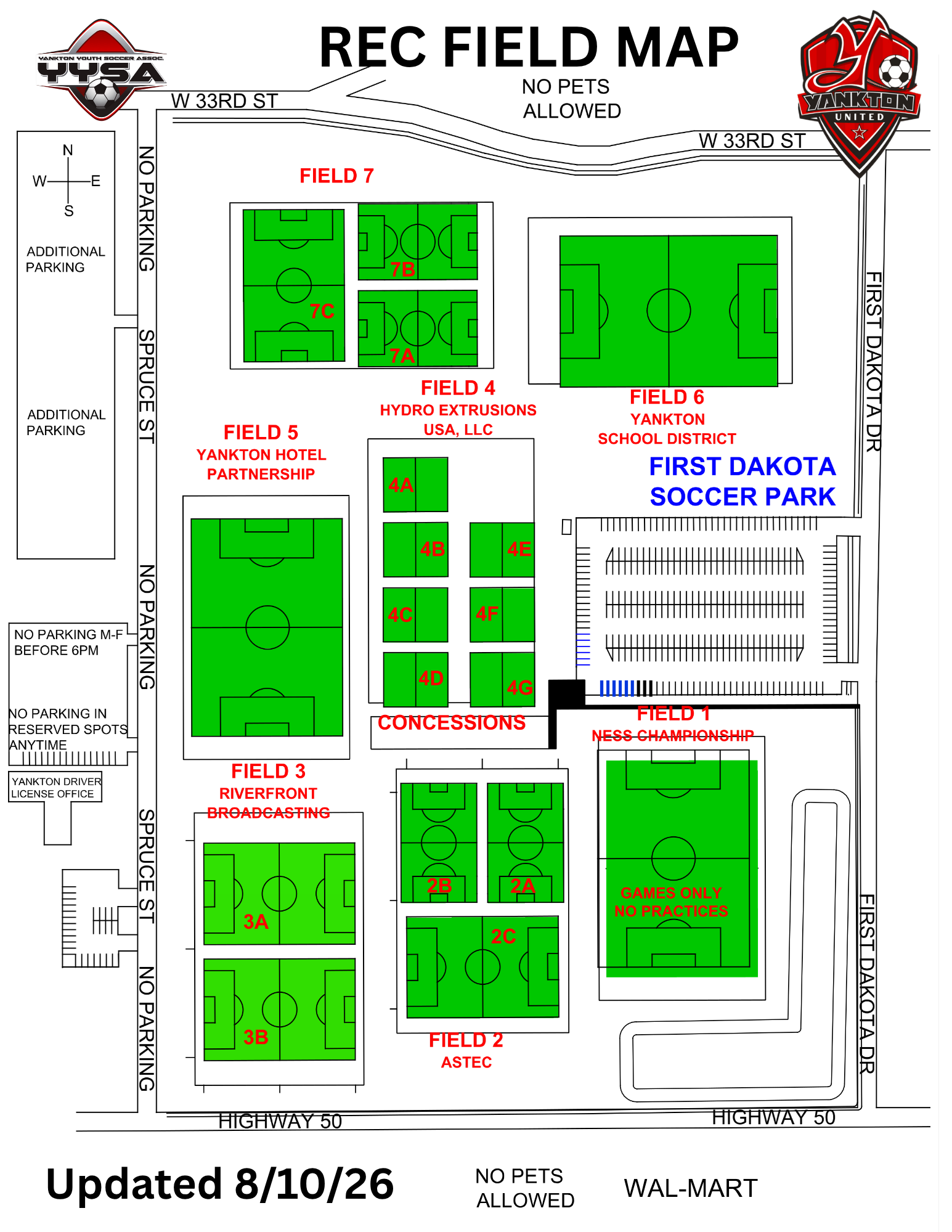
Field Map